Action node - IVR Question

Introduction
|
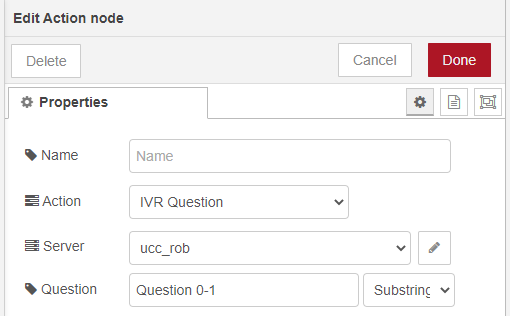
The Interactive Voice Response, or IVR, is a telephone application to take orders via telephone keypad or voice through a computer. By choosing menu options the caller receives information, without the intervention of a human operator, or will be forwarded to the appropriate Agent. Question action will allow the administrator to select a question from the default IVR of a configured A Unified Contact Center, or UCC, is a queue of interactions (voice, email, IM, etc.) that are handled by Agents. Each UCC has its own settings, IVR menus and Agents. Agents can belong to one or several UCCs and can have multiple skills (competencies). A UCC can be visualized as a contact center “micro service”. Customers can utilize one UCC (e.g. a global helpdesk), a few UCC’s (e.g. for each department or regional office) or hundreds of UCC’s (e.g. for each bed at a hospital). They are interconnected and can all be managed from one central location.. You can also just type the name of the question (if known). |
Note
IVR Question should be used in the incoming phase. The action can only be used to connect to an IVR Question within the same UCC. The connection to another UCC will result in an error - session not found.
Additional information:
IVR Questions can be created and edited using the SharePoint Dashboard - Dialogue Management widget. The customer will hear this questions while he/she is queued. Queue questions are asked based on choice from the customer. You can assign a parent question (like the Welcome Message or the Question to Voicemail) to each following question. Parent questions can be titled as "Question 0-1", then the next question would be named after the choice option. If the choice was "press 2", then the next question would be 2-1, 2-2, 2-3, and so forth.
There are default IVR Questions configured for each UCC:
- Entering Queue (e.g. Welcome Message or Message Closed)
- Question Queue (e.g. Question 0-1 that plays after the Welcome Message)
- CallBack, an IVR menu feature for voice, enables the customer to confirm or leave an alternative phone number to be called back by an available agent during business hours. Queue (e.g. Callback enter number)
- Waiting Queue (e.g. Queue 2 - Please hold. There are two persons ahead of you)
Read more about IVR Build-up or how to use the break element in Queue messages.
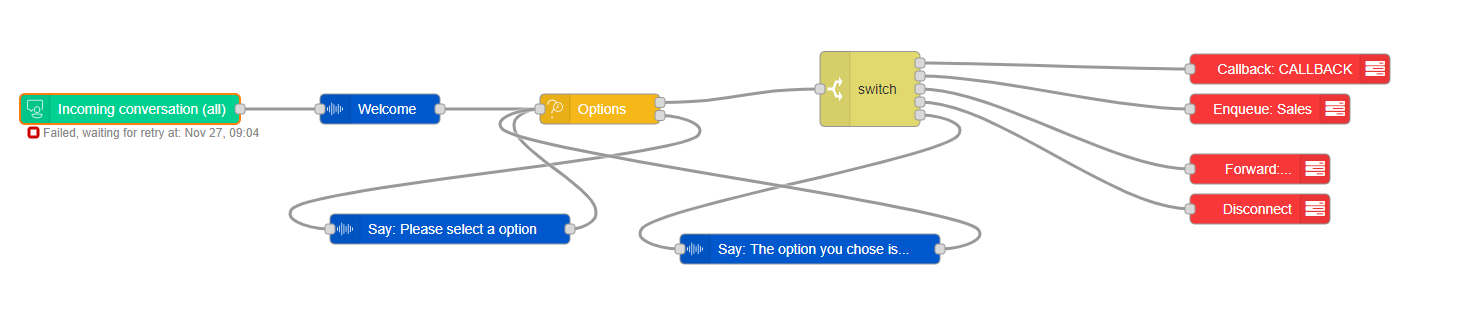
Example use in a flow layout (click to enlarge):
Learn more about other available Dialogue Studio - Dialogue Cloud Core Nodes.