Action node - Preferred Hunt

Introduction
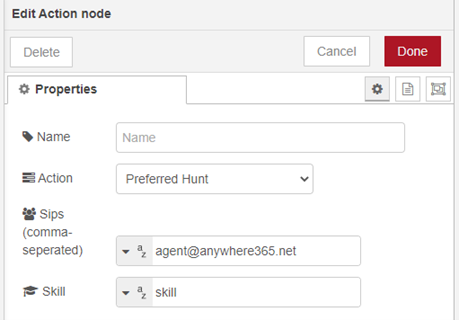
|
The Preferred Hunt action first attempts to offer the conversation to the configured preferred targets. If none of those targets accepts the conversation, the conversation continues with the normal hunting and ACD Automatic Call Distributor (ACD), also known as Automated Call Distribution System, is a component that redirects incoming calls to Agents. behavior of the configured skill. |
Note
Preferred Hunt should be used in the incoming phase.
What happens on success vs. fail
Preferred Hunt has two possible outcomes:
- Success: One of the configured preferred targets answers or accepts the conversation. The conversation is connected to that target.
- Fail (fallback): If none of the configured preferred targets answers or accepts the conversation, the conversation continues with the normal hunting and ACD behavior of the configured skill.
This fallback behavior applies when a preferred target:
- is not available,
- does not accept the conversation, or
- does not answer.
Required fields
Both fields below are required for this action.
Sips (Targets)
Enter one or more preferred targets, separated by commas.
Note
This does not need to be an Agent in a UCC A Unified Contact Center, or UCC, is a queue of interactions (voice, email, IM, etc.) that are handled by Agents. Each UCC has its own settings, IVR menus and Agents. Agents can belong to one or several UCCs and can have multiple skills (competencies). A UCC can be visualized as a contact center “micro service”. Customers can utilize one UCC (e.g. a global helpdesk), a few UCC’s (e.g. for each department or regional office) or hundreds of UCC’s (e.g. for each bed at a hospital). They are interconnected and can all be managed from one central location.. Any voice capable destination reachable by the UCC and/or your telephony provider can be created as a preferred target. (The hunting behavior difference of Agent vs. Non-Agent targets is outlined below).
Each target must start with sip: or tel:.
You can use:
- an agent SIP The Session Initiation Protocol, or SIP, is a protocol for multimedia communication (audio, video and data communication). SIP is also used for Voice over IP (VoIP). SIP has interactions with other Internet protocols such as HTTP and SMTP. address
- an agent PSTN number
- a non-agent SIP address
- an external PSTN number
Examples:
sip:agent@contoso.comtel:+31201234567sip:reception@contoso.com
The order of the configured targets is the order in which Preferred Hunt evaluates them.
If a configured SIP or PSTN value resolves to an agent known in the UCC, that value is treated as an agent target. If it does not resolve to an agent, it is treated as a non-agent target.
Skill
This is the skill applied to the conversation when Preferred Hunt starts.
While the preferred hunt is in progress, the conversation already belongs to this skill. As a result, the conversation is visible in the skill queue before the preferred hunt has completed, and other eligible agents can cherry-pick it.
If none of the preferred targets answers or accepts the conversation, normal hunting and ACD behavior continues for this skill.
Hunting rules: Agent vs. non-agent targets
Hunting behavior depends on whether the configured target is resolved as an agent target or a non-agent target.
- Agent targets: Agent targets are evaluated using the UCC's normal contact center rules for agent availability. This means Preferred Hunt checks whether the agent is available according to the UCC configuration, including presence requirements.
- Non-agent targets: Non-agent targets are hunted directly and do not use agent presence or sign-in checks.
If an agent target is available, the conversation is first offered to that agent.
If an agent target is not available, does not accept, or does not answer, Preferred Hunt does not continue forcing that target. The conversation then continues with the normal hunting and ACD behavior of the configured skill.
Example of the call flow with Preferred Hunt applied (click to enlarge)

Learn more about other available Dialogue Studio - Dialogue Cloud Core Nodes.