Measurements per flow of Power BI
Each dialogue flow has its own measurements. Below is an overview of all flows.
Note
The Power BI template is based on the historical (Call Detail Records (CDR) are the meta data of a converstation: who talked to whom, at which time, for how long and with which identity among other things (skill, optional classification, etc) which gets stored in your SQL (analytical) database.) dataset and reports on handled sessions. Conversations that are still waiting / not yet picked up are not included until they are handled.
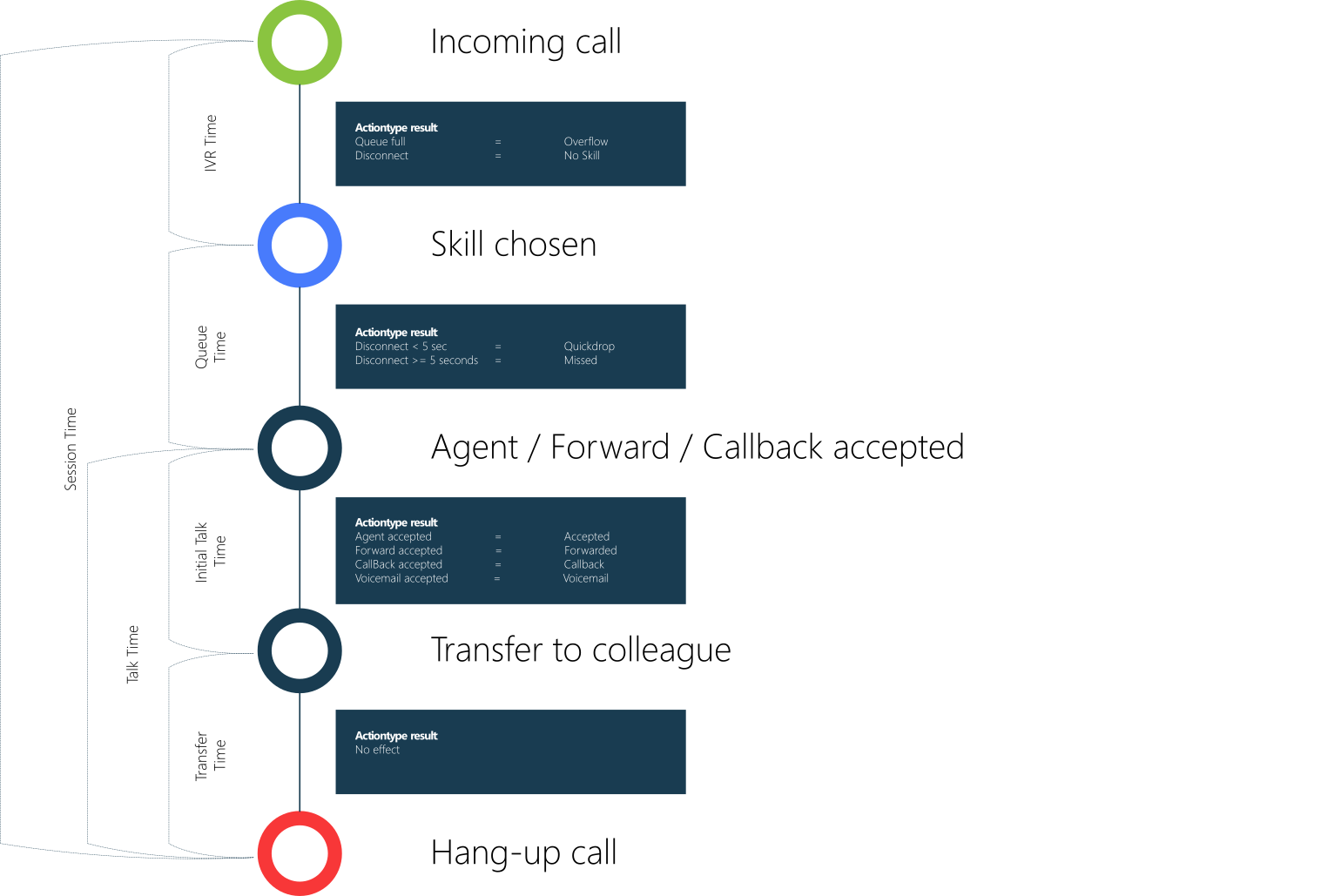
Inbound Call
Description
An Inbound Call is when a customer dials into a A Unified Contact Center, or UCC, is a queue of interactions (voice, email, IM, etc.) that are handled by Agents. Each UCC has its own settings, IVR menus and Agents. Agents can belong to one or several UCCs and can have multiple skills (competencies). A UCC can be visualized as a contact center “micro service”. Customers can utilize one UCC (e.g. a global helpdesk), a few UCC’s (e.g. for each department or regional office) or hundreds of UCC’s (e.g. for each bed at a hospital). They are interconnected and can all be managed from one central location.. The data for this call is recorded from the moment the UCC receives the call from the customer until the customer hangs up.
Types
-
Dialogue = Inbound
-
Modality = Call
-
Actiontype = See flow image
Flow
Inbound Chat
Description
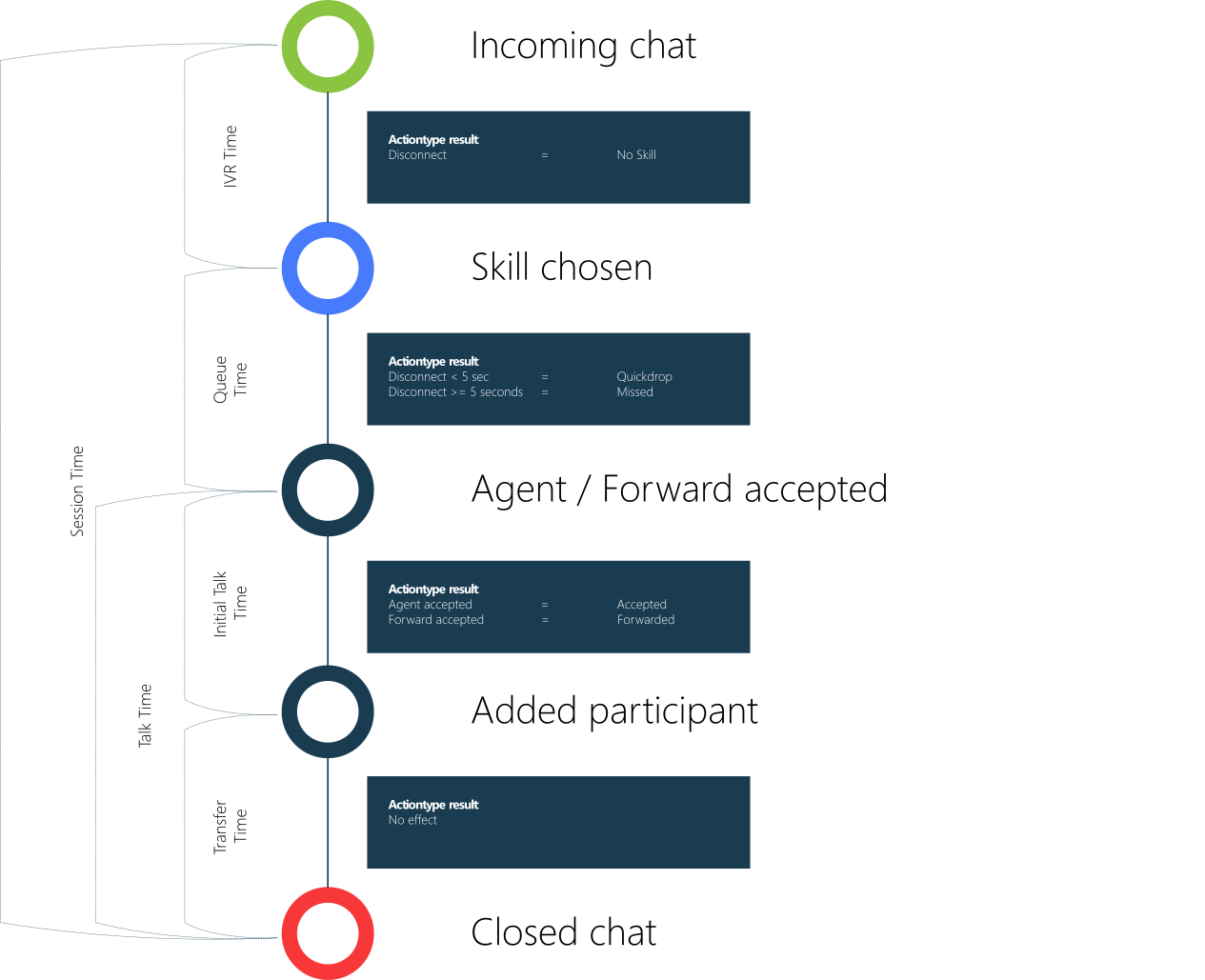
Inbound Chat is when a customer initiates a conversation with the UCC via Skype for Business or Webchat. The data recording for this chat begins when the UCC receives the message and ends when either the customer or agent ends the chat.
Types
- Dialogue = Inbound
- Modality = Chat
- Actiontype = See flow image
Flow
Inbound text
Description
Inbound Text is when a specific text-based dialogue is passed through Dialogue Manager (via one of the Dialogue Providers). Inbound Text is processed through channels:
-
Emails via the Email Dialogue Provider
-
WhatsApp or SMS via the WhatsApp and SMS Dialogue Provider
-
WebChat via the WebChat for WebAgent
Tip
The various channels are all marked as Text to Power BI, so use a logical Skill name if you want to separate them.
When a new message is received, an Inbound Text session is initiated. This session can end when the Agent presses 'Handled' in the Dialogue Cloud WebAgent, or when the Customer presses the 'Close Chat' button (WebChat only), or when the Time to Live has expired (WebChat only). Note that if a follow-up message is sent after the session has been closed, a new Text session will be created. If the session is still open (whether queued or connected), the follow-up message will be added to the existing Text session.
Note
Outside business hours (or during holidays), inbound text can remain queued until processing starts. This can shift when the session becomes visible in reporting, which can affect the reported start time.
Types
- Dialogue = Inbound
- Modality: Text
- Actiontype = See flow image
Flow
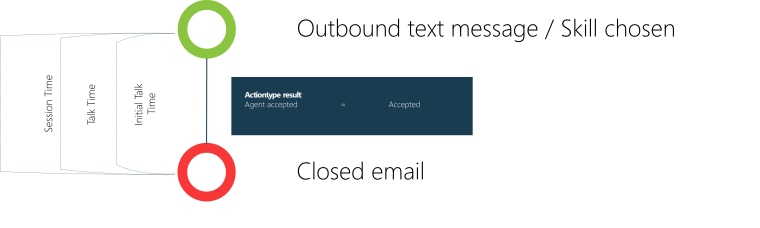
Outbound text
Description
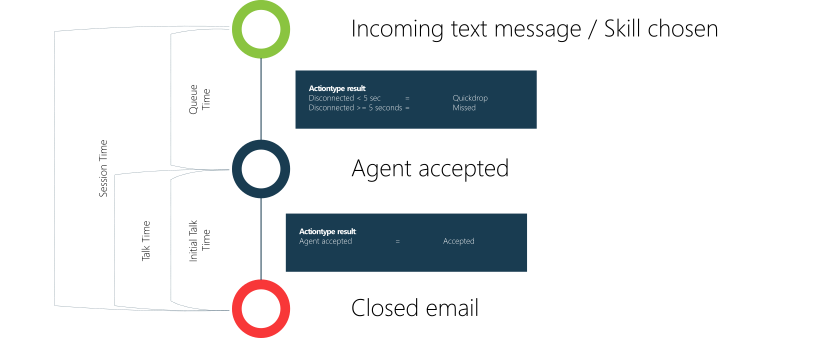
When an Agent starts a New Email session in Dialogue Cloud WebAgent, an Outbound Text is initiated. This Outbound Text session will end when the Agent presses "Handled" in Dialogue Cloud WebAgent. If the customer responds to the Outbound Text after the Agent has closed the session, it will start an Inbound Text session.
Types
- Dialogue = Outbound
- Modality: Text
- Actiontype = See flow image
Flow
Direct call
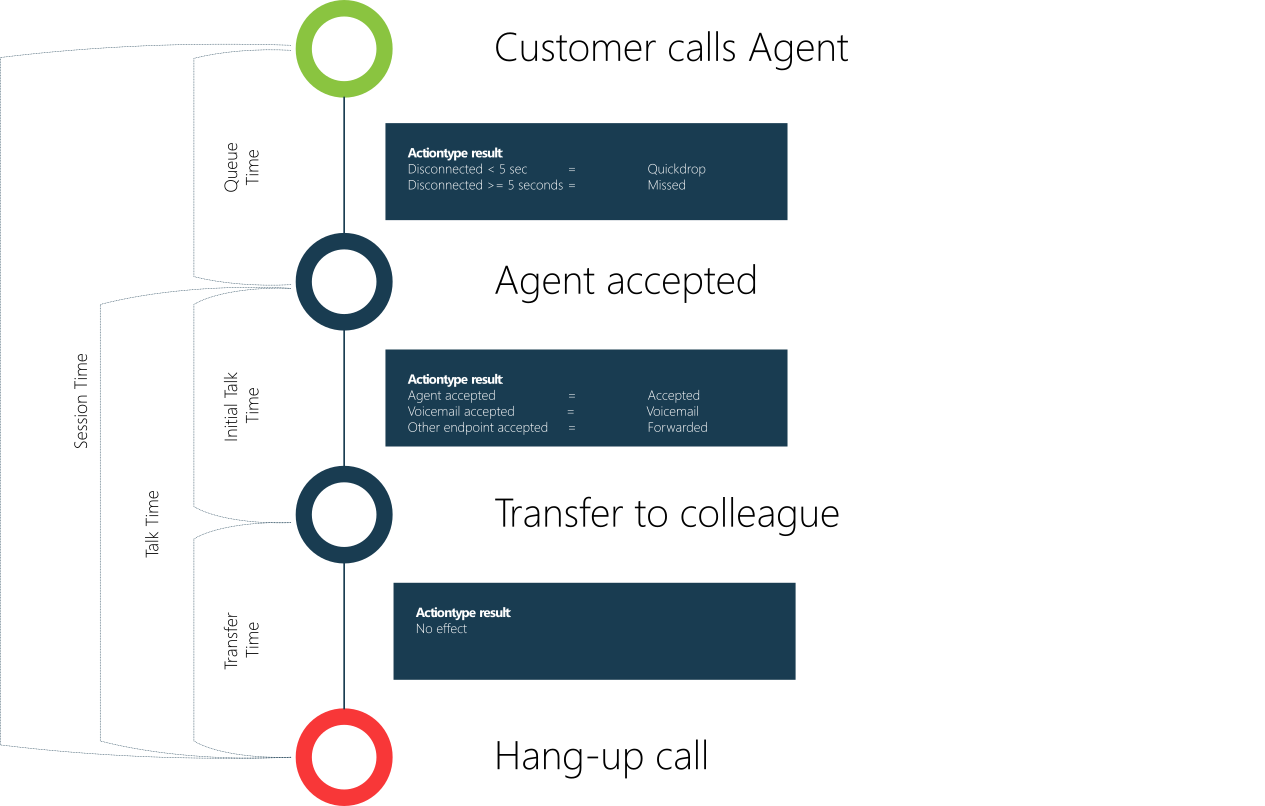
Description
A direct call is when the The Interceptor is a service installed on AnywhereNow. It monitors all calls during set-up on endpoints of active Agents. By intercepting that call set-up and redirecting it to an UCC it lets you manage the direct inbound and outbound dialogues of the contact center agents. intercepts a conversation from a customer to an agent. The session starts recording when the UCC received the intercepted call and stops when the customers hang-up.
-
Learn more about the Interceptor
Types
- Dialogue = Direct
- Modality = Call
- Actiontype = See flow image
Flow
Outbound call
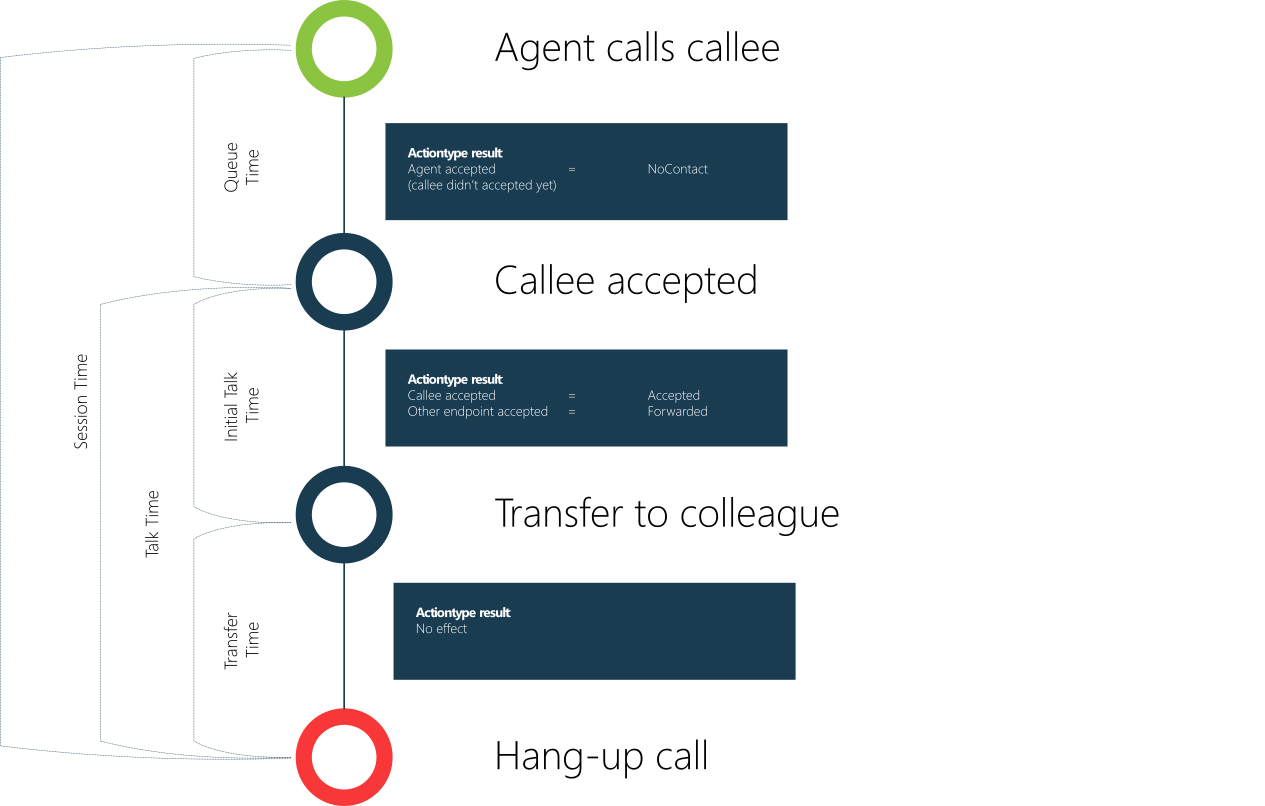
Description
An outbound call is when the Interceptor intercepts a conversation from an agent to a callee.
-
Learn more about the Interceptor
Types
- Dialogue = Outbound
- Modality = Call
- Actiontype = See flow image
Flow
Outbound Campaign Dialer
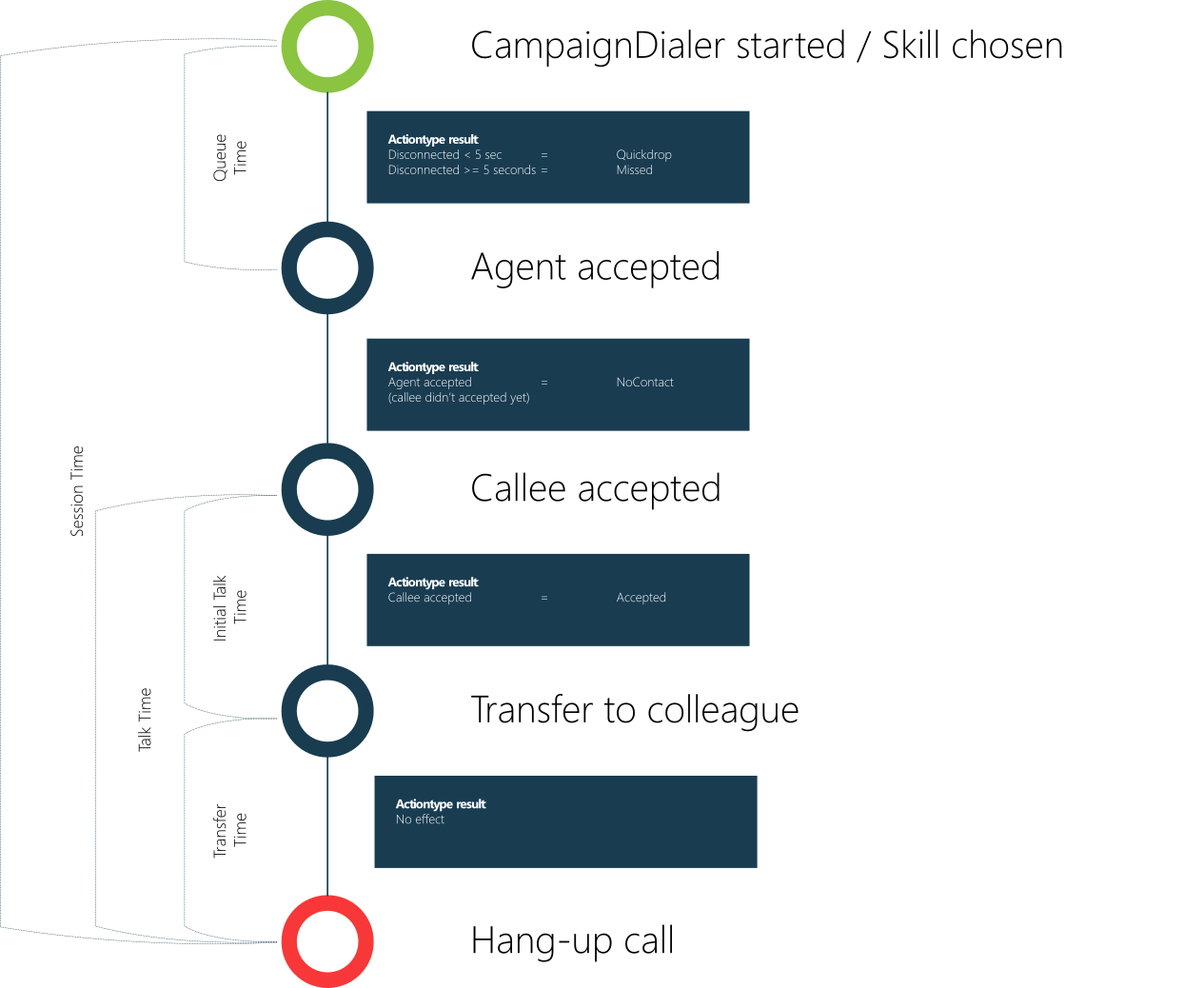
Description
An outbound Campaign Dialer conversation is a session started by the Campaign Dialer.
-
Learn more about the Campaign Dialer
Types
- Dialogue = Outbound
- Modality = Campaign Dialer
- Actiontype = See flow image
Flow
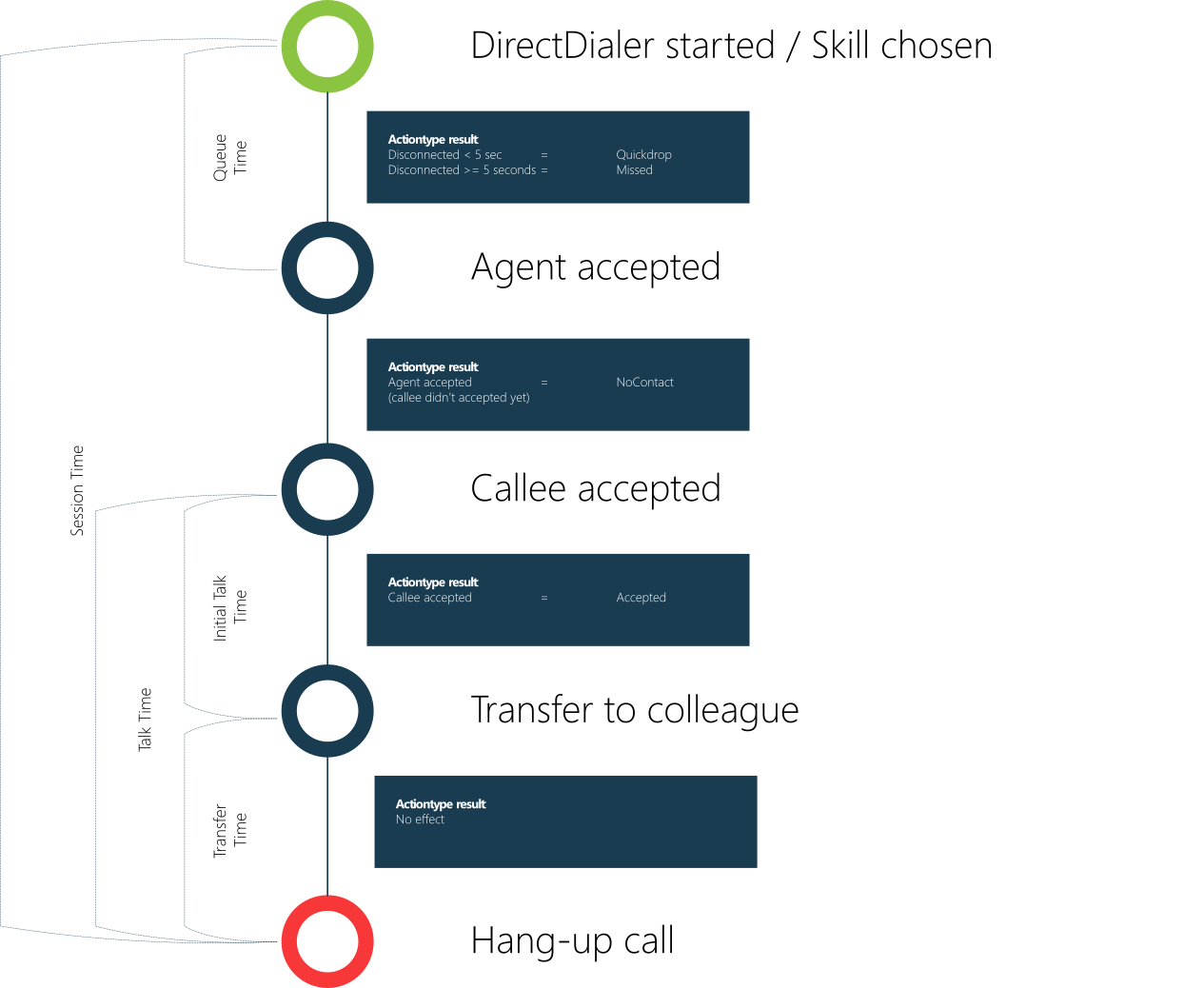
Outbound Direct Dialer
Description
An outbound Direct Dialer conversation is a session started by the Direct Call Interceptor in the Snapper or WebAgent.
- Snapper: Direct Call Interceptor, see: Configure Direct Call Interceptor (DCI) for Snapper
- WebAgent: Direct Call Interceptor, see: Configure Direct Call Interceptor / Outbound Calling for WebAgent
Types
- Dialogue = Outbound
- Modality = Direct Dialer
- Actiontype = See flow image
Flow
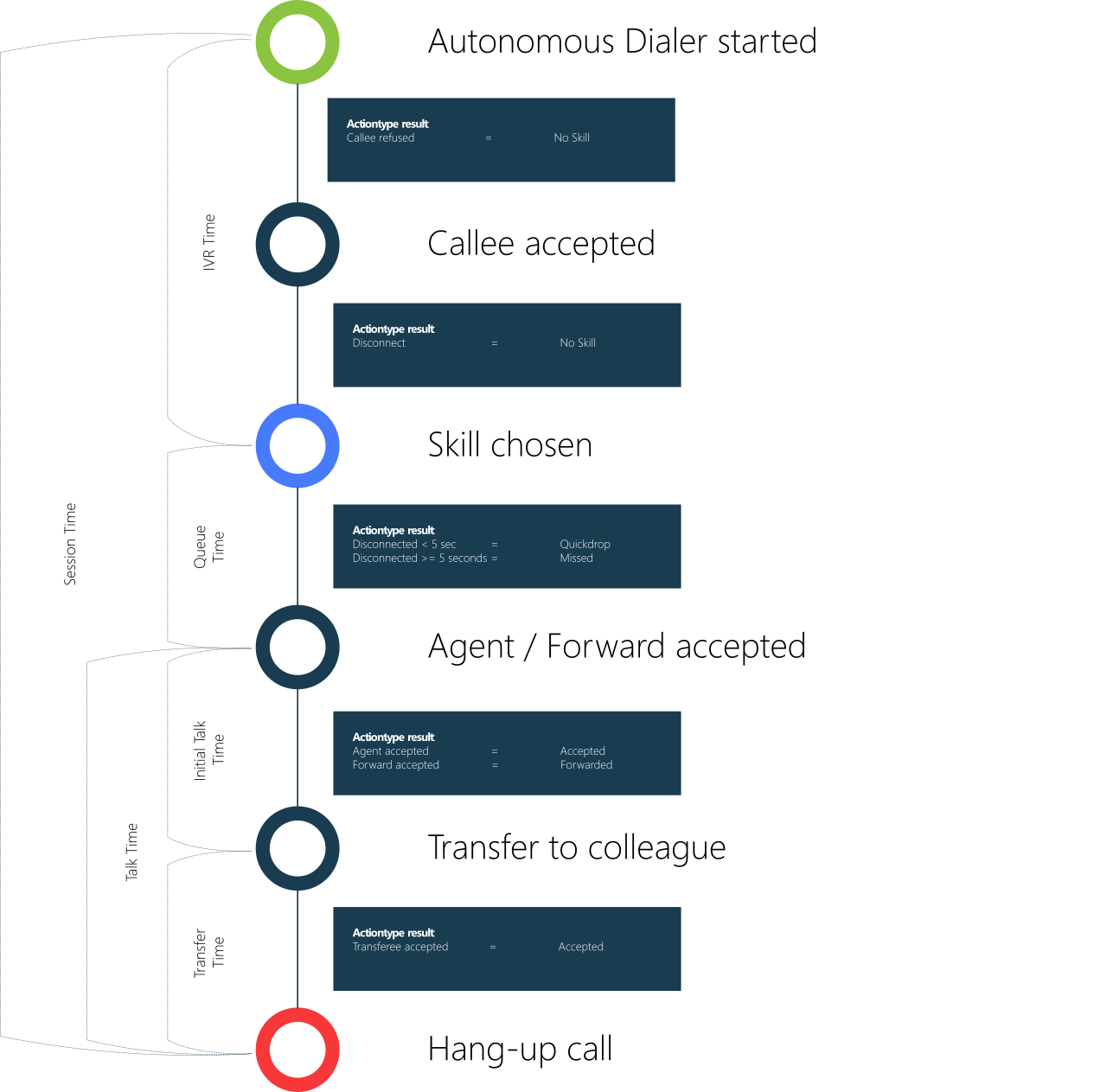
Outbound Autonomous Dialer
Description
An outbound Autonomous Dialer conversation is a session started by the Autonomous Dialer.
-
Autonomous Dialer, see: Installing the Autonomous Dialer
Types
- Dialogue = Outbound
- Modality = Autonomous Dialer
- Actiontype = See flow image
Flow
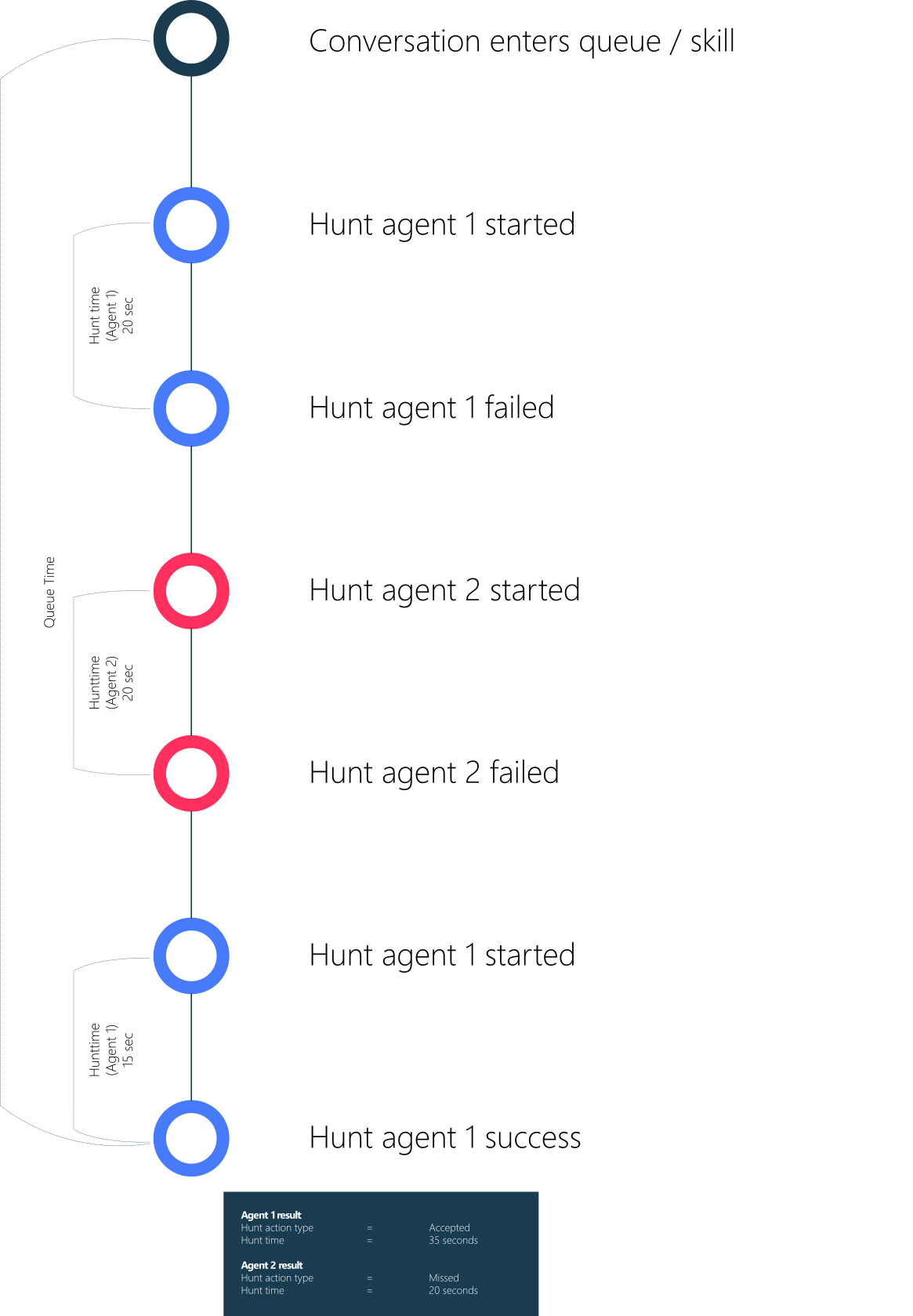
Agent Hunt time
Description
A hunt is when the UCC contacts the agent for a conversation and the agent needs to accept. Hunting is used in the following dialogues:
- Inbound call
- Inbound chat
- Inbound email
- Inbound text
- Direct call
- Outbound Campaign Dialer
- Outbound Direct Dialer
- Outbound Autonomous Dialer (if conversation continues in a Skill)
Flow
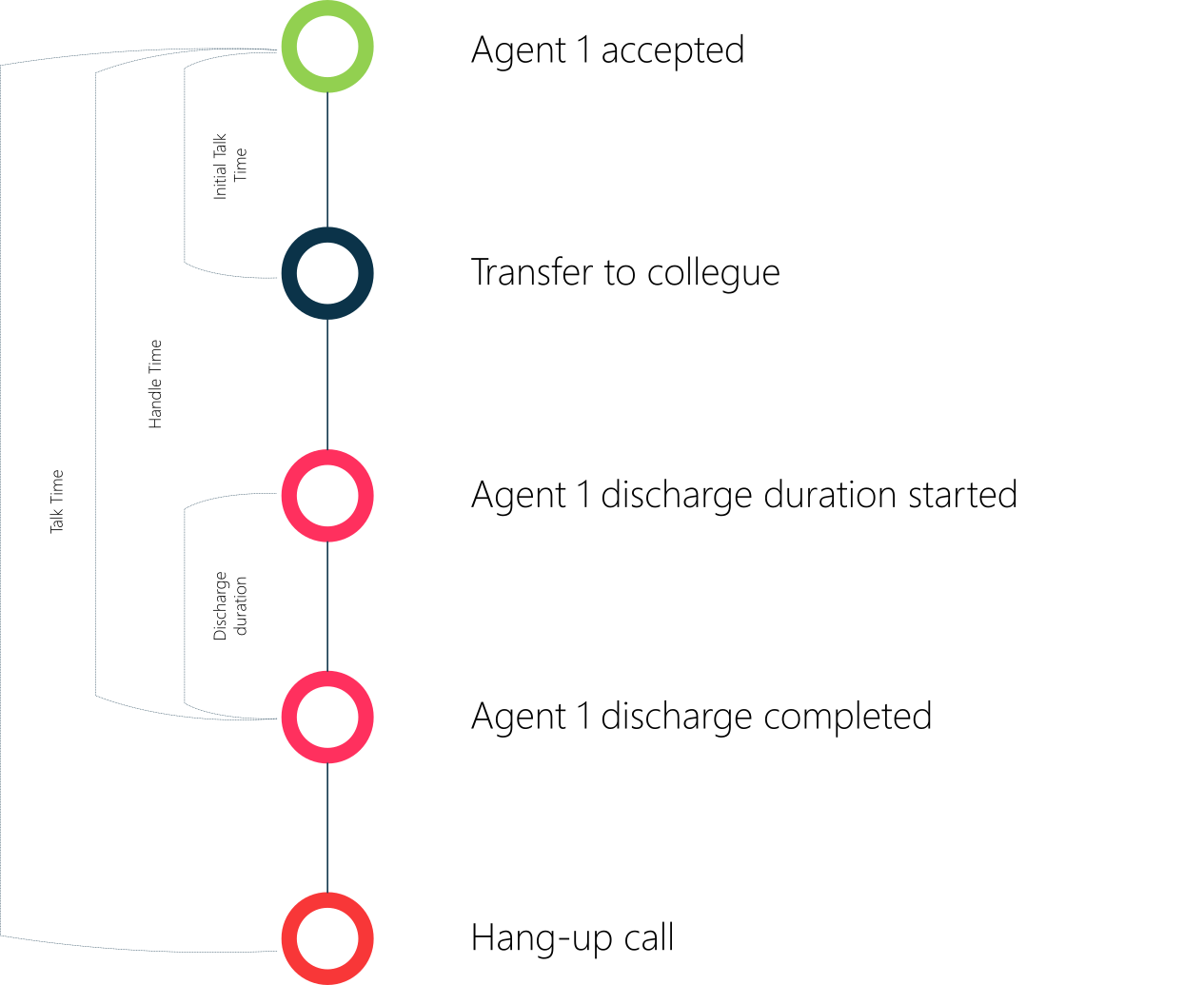
Agent Discharge
Description
Discharge time is the time spent wrapping up the conversation.
Flow
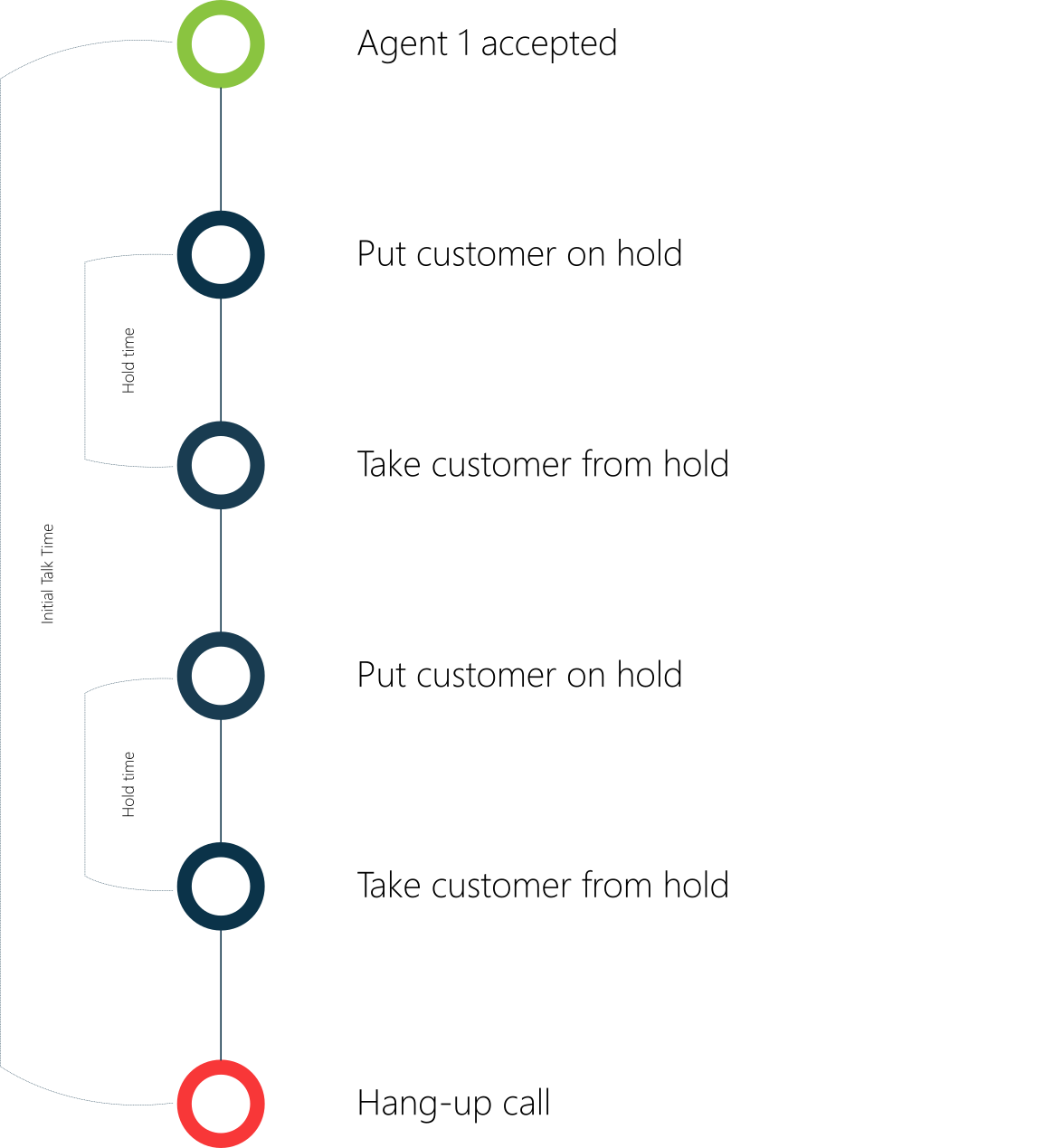
Hold time
Description
Hold time is the total time the customer has been put on hold during a conversation.
Flow