AutoAttendant Prompt for Core
Note
This feature requires an additional prompt. Extra license may be required. Please contact your Sales Contact to verify.
Note
This feature is supported in Dialogue Cloud via Dialogue Studio
Functional Information
When a customer calls to the A Unified Contact Center, or UCC, is a queue of interactions (voice, email, IM, etc.) that are handled by Agents. Each UCC has its own settings, IVR menus and Agents. Agents can belong to one or several UCCs and can have multiple skills (competencies). A UCC can be visualized as a contact center “micro service”. Customers can utilize one UCC (e.g. a global helpdesk), a few UCC’s (e.g. for each department or regional office) or hundreds of UCC’s (e.g. for each bed at a hospital). They are interconnected and can all be managed from one central location. in which the AutoAttendant is configured, the customer is asked to type in the name of the contact that he/she is trying to reach. This can be either the first name or the last name. The input will come from a telephone keypad and therefore the T9 translation rules will apply.
If a customer is looking for John Doe, the following should be typed in 5646 = John or 363 = Doe
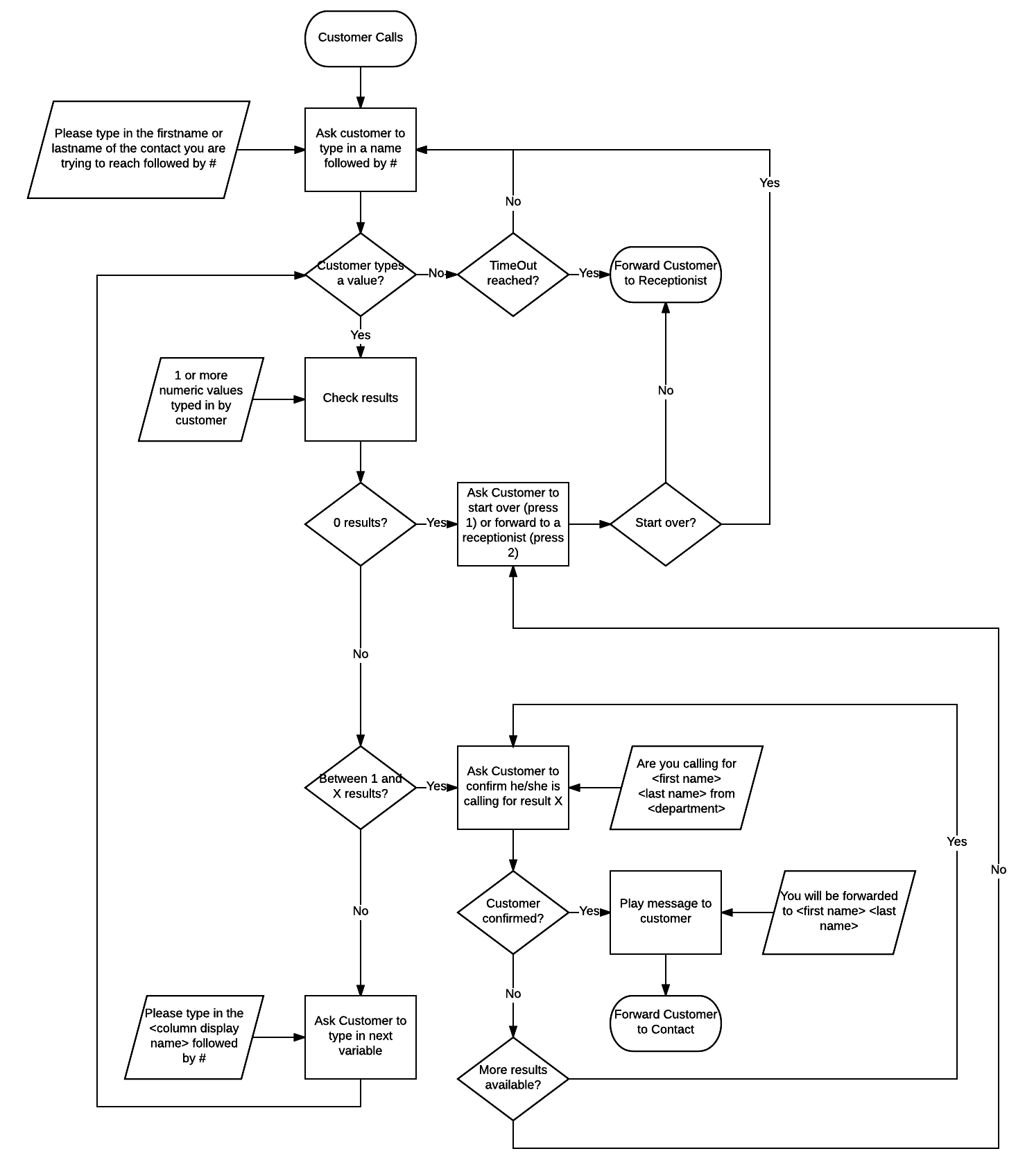
No results found
If there are no results found, the system asks the customer if he/she would like to type in a new name, or would like to be forwarded to an alternative telephone number / The Session Initiation Protocol, or SIP, is a protocol for multimedia communication (audio, video and data communication). SIP is also used for Voice over IP (VoIP). SIP has interactions with other Internet protocols such as HTTP and SMTP. address (e.g. a reception UCC), so a receptionist can help the customer finding the right person.
1 result found
When there is only 1 result, the system asks to confirm if the customer is calling for “John Doe from Department X”. If this is the case, the customer will be forwarded to this contact. If not, the system asks the customer if he/she would like to type in a new name, or would like to be forwarded to an alternative telephone number / SIP address (e.g. a reception UCC), so a receptionist can help the customer to find the right person.
Multiple results found
If there are multiple results found, the system will ask for confirmation 1 result after another (the results are sorted on alphabetical order). If the customer does not confirm he/she is calling for the first contact, the second contact will be offered to the customer.
- Are you calling for John Doe from Department X press 1 for yes, press 2 for no.
Customer presses 2; - Are you calling for John Doe from Department Y press 1 for yes, press 2 for no
If the customer does not confirm any of the results, the system asks if he/she would like to type in a new name, or would like to be forwarded to an alternative telephone number/SIP address (e.g. a reception UCC), so a receptionist can help the customer to find the right person.
Too much results found
In case more than X results are found (X can be configured; if this option is not required it can be set to a high number 999 for example), the system asks the customer to fill in a department (e.g. sales).
Again, the same rules apply after the department name is filled in.
The number of variables for a contact within your organization are by default:
- First name
- Last name
- Department name
- SIP address/telephone number to which the customer should be forwarded
Additionally, other parameters can be defined. After both the name and the department is filled in and there are still more than X results, additional variables can be used to fine tune the results.
The following flowchart shows how the AutoAttendant will work.