Install Email Dialogue Provider Component
Note
An Dialogue Cloud WebAgent for Omnichannel license is required.
Note
An Enterprise license or higher is required to access these features.
Requirements
- Microsoft Office365 mailbox
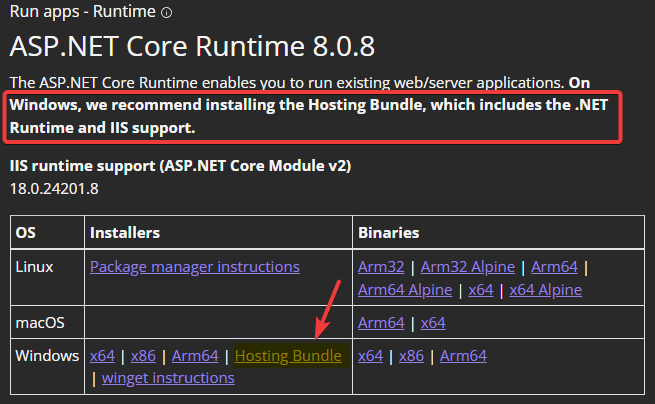
- Install ASP.NET Core 6.0.8 (or a later 6.0 series) Hosting A bundle is a fixed combination of our software platform elements of very specific versions. These are designed and tested to optimally work together to assure their intended function and interoperability. (if you have not already done this)
-
Bundle 2024.02 and later: Microsoft ASP.NET Core 8.0.0 (or a later 8.0 series) Hosting Bundle installed (may already be installed).
- (Graph only) An Azure App with the following permissions, Learn More
Note
If for company policies the access needs to be restricted, please see: Limit Mailbox Access
- Mail.ReadWrite
- Mail.Send
- User.Read.All
- Directory.Read.All
%20hostingbundle.png)
Installation
Deploy package
-
Unzip the AnywhereNow Email Dialogue Provider package
-
Edit the properties.ps1
-
Domain = Domain of the install account
-
UserName = Username of the install account
-
-
Run install.ps1 in PowerShell as administrator
Add Plugin Settings
-
Open the A Unified Contact Center, or UCC, is a queue of interactions (voice, email, IM, etc.) that are handled by Agents. Each UCC has its own settings, IVR menus and Agents. Agents can belong to one or several UCCs and can have multiple skills (competencies). A UCC can be visualized as a contact center “micro service”. Customers can utilize one UCC (e.g. a global helpdesk), a few UCC’s (e.g. for each department or regional office) or hundreds of UCC’s (e.g. for each bed at a hospital). They are interconnected and can all be managed from one central location. Config page on SharePoint
-
Open the Plugin Settings list
-
Add the following settings:
Setting Value Description Setting: ClientId
Scope: EmailDialogueProviderThe app id of the app created in azure
Azure app ID.
Setting: ClientSecret
Scope: EmailDialogueProviderThe client secret value of the app created in azure.
Important
Use the Value, not the Secret ID.
Note
Alternatively you can use EncryptedClientSecret
Encrypt the Client Secret with the AnywhereNow Encryption ToolThe client secret.
Setting: EmailAddress
Scope: EmailDialogueProviderusername@domain.com
The e-mail address of the mailbox.
Setting: Enabled
Scope: EmailDialogueProviderTRUE
Enable the provider.
Setting: Tenant
Scope: EmailDialogueProviderThe tenant id of the azure tenant in which the app is created
Microsoft Entra tenant
Setting: Type
Scope: EmailDialogueProviderGraph
Use Microsoft Graph API ( https://learn.microsoft.com/en-us/graph/overview ) for the connection to the mailbox
-
For all the available settings to finetune the Email Dialogue Provider, see: Email Dialogue Provider Plugin Settings Overview
Enable Outbound
-
Add the following settings
Setting Value Description Setting: OutboundTextSkill
Scope: WebAgentServiceName of the outbound skill (default is empty) For example: OUTBOUNDTextSkill
Note
The Skill needs to be created in the UCC, but doesn't have to be assigned to an agent.
Used for enabling the Outbound Text Session. This Skill is also used for Reporting purposes.
Add Endpoint
-
Open the UCC Config page on SharePoint
-
Open the Plugin Settings list
-
Add DialogueManager settings endpoint to ListsPlugin ListsEndpoints
Note
Add to the existing item and separate with "Enter".
Setting Value Description Setting: ListsEndpoints
Scope: ListsPluginhttp://FDQN stands for Fully Qualified Domain Name and specifies the exact location in the tree hierarchy of the Domain Name System (DNS). An example for [hostname].[domain].[top level domain] is [www].[microsoft].[com]/webagentservice/api/v1/settings
http://FQDN/DialogueManager/api/v1/settings
http://FQDN/EmailDialogueProvider/api/v1/settings
Warning
It is important to configure this setting to one main regional URL when using multiple services in the same region. If this is not done, you may experience unexpected behavior.
Warning
Make sure to leave the fqdn to this service configured as a ".local" URL, especially when using multiple UCC services in the same region. If this is not done, the UCC cannot reach the right webserver internally leading to undesired or non-functional WebAgent behavior.
Note
URL needs to be accessible from the UCC Service to the Email Dialogue Provider.
Used by the ListsPlugin to push the settings from the settings from SharePoint to the URL of the service.
Create and assign Skills
-
Create regular skill, see: Standard Skill
-
Add Agents, see: Agents
-
Assign Skills to Agents, see: Skills per Agent
Add Plugins Attributes
-
Open the UCC Config page on SharePoint
-
Open the Plugin Attributes list
-
Add the following attributes:
Display Name System Name Show on Extension Window Show on A toast is a pop-up instant message or audio call notification the user receives on his desktop. Order Open Automatically Category EmailSubject Subject No No 1 No Contact SenderDisplayName SenderName No No 2 No Contact SenderEmailAddress SenderUri No No 3 No Contact EmailBody Content No No 4 No Contact
Add Plugin Flow Settings
-
Open the UCC Config page on SharePoint
-
Open the Plugin Flow Settings list
-
Below an example on how to setup the Plugin Flow Settings:
Attribute Operator Value Order Action Skill Subject Contains Example value 1.00 Skill TextHandling Subject Does not contains Example value 2.00 Skill TextHandling
More information about Plugin Flow Settings, Learn More
For more example, Learn More
Restart UCC and validate
-
Login to the AnywhereNow Application Server
-
Start Services
-
Restart "Unified Contact Center"
-
See the logs if Dialogue Manager is successfully loaded
UCC Logs
C:\ProgramData\Anywhere365\Core\Service\UnifiedContactCenterService\logs
2019-04-18 15:39:30,716 [5] Wsp.Anywhere365.Ucc.Lists.ListsPlugin.ListsRequest DEBUG - ListsPlugin SendRequest Endpoint: http://FQDN/EmailDialogueProvider/api/v1/settings - body: {"Version":"1.1.7"...}Email Dialogue Provider log:
2019-04-18 16:13:32.7046 DEBUG SettingsManager - Added settings for UCC ucc__texthandling
2019-04-18 16:13:32.7075 TRACE ProviderManager - TryAddUcc ucc__texthandling