How to enable Skype for business front end server in Draining state (maintenance mode).
Introduction McuDrainingStateMonitoring
With this feature enabled, the ucc monitors if a front-end server is in draining state (maintenance mode). When one of the front-end servers in the pool is set into draining state, the cached conferences on the front-end pool will be cleaned up. When using the command to enable draining state on the front-end server that process will wait until active calls are finished and those conferences will not be cached. New calls will immediately be setup on the remaining front-end servers in the pool.
Enable the feature in the ucc config file.
-
Open your ucc config file and expand the line <UnifiedContactCenters> to
XML<UnifiedContactCenters alwaysModifyCas="true" enableMcuDrainingStateMonitoring="true"> <UnifiedContactCenter Name="ucc_name"> <SettingsProvider>sharepoint</SettingsProvider> <SettingsUrl>http://sharepoint.domain.com/sites/ucc/ucc_name</SettingsUrl> </UnifiedContactCenter>
-
Restart the ucc.
-
The logfile will show this line
Log2018-01-17 11:35:16,932 [52] m1 WARN - m1 McuDrainingStateMonitor: 'frontend01.domain.com' failed to read. Permission denied.
-
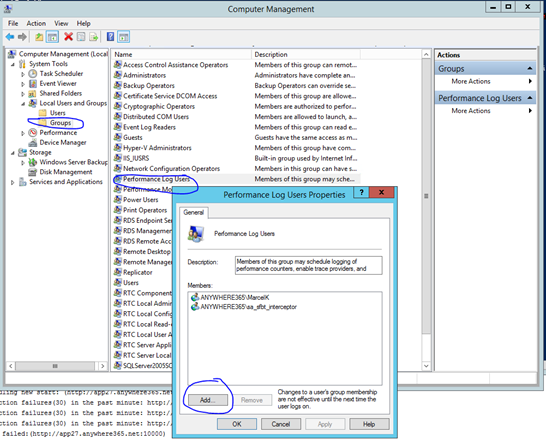
Add the service account to the performance log users on all front ends in the pool in computermanagement
-
The logfile will display this
Log2018-01-17 11:35:35,395 [8] ucc_rtm INFO - ucc_rtm McuDrainingState: enable conference caching.
Monitor Active conferences in the front end server and monitor Draining state per server
-
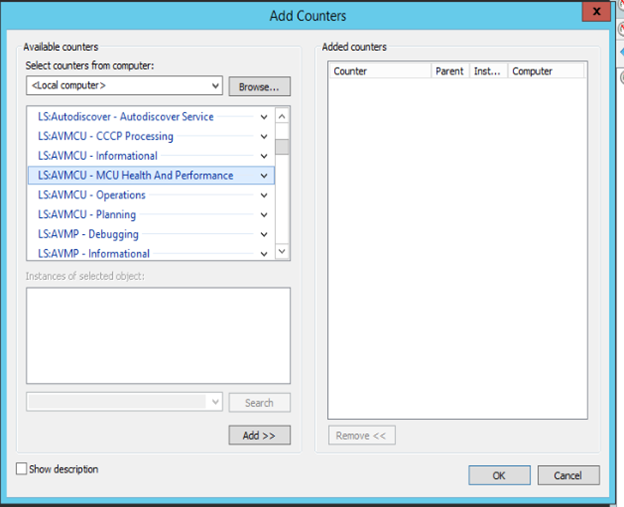
Go to one of the front ends servers and go to the performance monitor. Add these values for each front end server.
ValuesVALUE="\LS:AVMCU - MCU Health And Performance\AVMCU - MCU Draining State" VALUE="\LS:AVMCU – Operations\AVMCU – Number of Conferences"
-
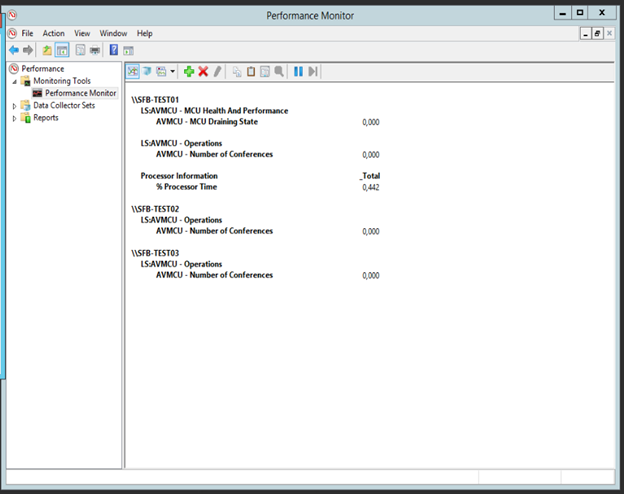
When you start the failover on the first server it will show value 1 for draining state. The number of conferences on all servers will become 0.
Actual failover
-
Connect to the front end server that you want to put in maintenance mode.
-
Disable the The Interceptor is a service installed on AnywhereNow. It monitors all calls during set-up on endpoints of active Agents. By intercepting that call set-up and redirecting it to an UCC it lets you manage the direct inbound and outbound dialogues of the contact center agents. service manually.
-
Open PowerShell as administrator on the front end server and use the following command.
PowerShellInvoke-CsComputerFailOver -ComputerName <Front End Server to be patched>
-
The ucc log will show this in the logfiles.
Logs2018-01-17 11:42:17,009 [5] ucc_rtm WARN - ucc_rtm McuDrainingState: disable conference caching. Servers in drain mode: frontendserver1.domain.com 2018-01-17 1:42:17,016 [5] ucc_rtm INFO - ucc_name UccConference: cancelling conference, usages: 1
-
Call traffic will continue on other front end servers.
Failback
-
If maintenance is over you can use the failback command.
PowerShellInvoke-CsComputerFailBack -ComputerName <Front End Server to be patched>
-
Enable the interceptor service manually.