How to Encrypt the SQL CDR Connection Strings
Introduction
With AnywhereNow you can encrypt various individual parts of your SQL Connection String for your Call Detail Records (CDR) are the meta data of a converstation: who talked to whom, at which time, for how long and with which identity among other things (skill, optional classification, etc) which gets stored in your SQL (analytical) database. Connection information. This allows you to encrypt the "values" part of each Connection String element (like Servername, UserId, Password, etc.) to mask them from immediate visibility on a SharePoint page, which may be visible to other users.
Warning
The Encrypted Connection String will only work on the SharePoint field CDRConnectionString in the Settings menu to be used by the A Unified Contact Center, or UCC, is a queue of interactions (voice, email, IM, etc.) that are handled by Agents. Each UCC has its own settings, IVR menus and Agents. Agents can belong to one or several UCCs and can have multiple skills (competencies). A UCC can be visualized as a contact center “micro service”. Customers can utilize one UCC (e.g. a global helpdesk), a few UCC’s (e.g. for each department or regional office) or hundreds of UCC’s (e.g. for each bed at a hospital). They are interconnected and can all be managed from one central location. Core.
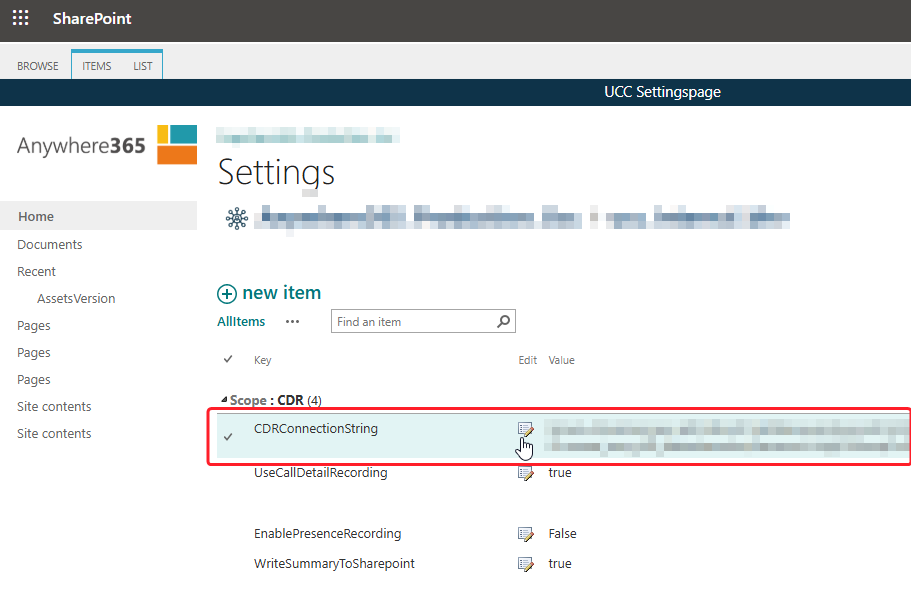
It will not work for any of the other UCC services like CallPropertyService, UniversalTimelineService, DialogueManager, WebAgentSettings.
Find Encrypted Tokens list
-
Open your UCC config site on SharePoint
-
Open Settings (top-right)
-
Open Site contents
-
Open the EncryptedTokens list
-
The following columns should exist.
-
Title
-
Name: Title
-
Type: Single line of text
-
-
Key
-
Name: wsp_ucc_et_key
-
Type: Single line of text
-
-
Value
-
Name: wsp_ucc_et_value
-
Type: Single line of text
-
-
-
Add Encrypted Token(s)
-
Open the EncryptedTokens list
-
Add + new item:
-
Title: "Enter any unique name as a title" example: SqlCdr password 1
-
Key: "Technical key name in {} brackets", example: {encryptedTokenKeyName1}
-
Value: "Encrypted string of the original value" example: xoZ9HvpaP5eGPALVdZzVJA== (Created with A365.PWTool.exe)
-
Encrypt CDRConnectionString
Single value encrypted as token
-
Open Settings list
-
Edit CDRConnectionString
ConnectionstringServer=myServerName\myInstanceName;Database=myDataBase;User Id=myUsername;Password=myPassword;
-
Change to
ConnectionstringServer=myServerName\myInstanceName;Database=myDataBase;User Id=myUsername;Password={encryptedTokenKeyName1};
Your myPassword value is now stored in SharePoint (and the UCC) only as an encrypted value.
Multiple values encrypted as token
You can have multiple encrypted tokens in 1 connection string.
Server={encryptedTokenKeyName1};Database={encryptedTokenKeyName2};User Id={encryptedTokenKeyName3};Password={encryptedTokenKeyName4};