Install WebAgent Service
The WebAgent Service is used for communication between the WebAgent FrontEnd and Dialogue Cloud server components. This installation is not the installation of the WebAgent FrontEnd itself which is globally hosted and managed by AnywhereNow.
Prerequisites
Licensing prerequisites
For licensing requirements or renewal questions, contact your AnywhereNow representative.
Configuration prerequisites
-
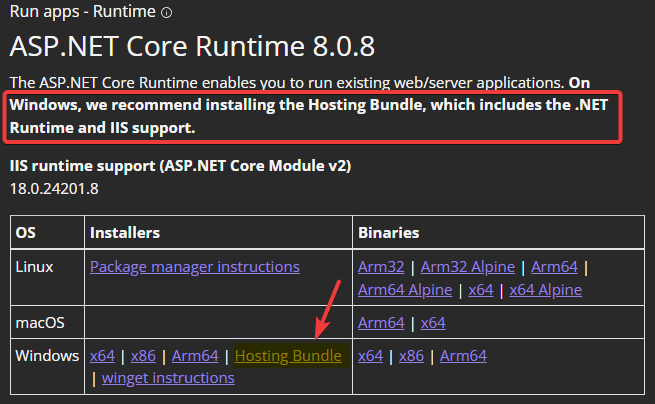
A bundle is a fixed combination of our software platform elements of very specific versions. These are designed and tested to optimally work together to assure their intended function and interoperability. 2022.06 and later: Microsoft ASP.NET Core 6.0.8 (or a later 6.0 series) Hosting Bundle installed (may already be installed).
-
Bundle 2024.02 and later: Microsoft ASP.NET Core 8.0.0 (or a later 8.0 series) Hosting Bundle installed (may already be installed).
-
EventForwarder Plugin installed and configured for WebAgent, see: Installing Event Forwarder Plugin
-
ApiPlugin installed and configured, see: Install API plugin
-
DC2023.03 or lower: CallControls Plugin installed and configured, see: Install Call Controls plugin
Important
Please note that as of DC2023.04 or higher, the CallControls Plugin is no longer needed as a separate plugin as its features have been integrated into the ApiPlugin. You may safely remove any associated settings or configurations related to this plugin. Dialogue Cloud will remove the settings if a bundle upgrade has been requested through the Formerly known as Partner Portal. A redesigned web portal for managing Dialogue Cloud deployments..
-
ListsPlugin installed and configured, Install Lists plugin
-
(Optional) CallProperty service installed and configured, Install Call Property Service
-
(Optional) Universal Timeline service installed and configured for WebAgent, Install Universal Timeline Service
%20hostingbundle.png)
Installation
Deploy package
-
Unzip the WebAgent Service package
-
Edit the properties.ps1
-
Domain= Domain of the install account -
UserName= Username of the install account
-
-
Run installWebAgentService.ps1 in PowerShell as administrator
Check if webservice is available from the device the agent will be using: https://FDQN stands for Fully Qualified Domain Name and specifies the exact location in the tree hierarchy of the Domain Name System (DNS). An example for [hostname].[domain].[top level domain] is [www].[microsoft].[com]/WebAgentService/api/v1/
Note
The webservice needs to be available over HTTPS from the internet (Agent -> WebAgent FrontEnd -> WebAgentService), without errors and a valid certificate.
You should get an empty page. You can verify this by opening Developer Tools in your browser and check the network tab.
In here your should get a 200 OK response.
Note
This webservice URL needs to be shared with your AnywhereNow representative to be white listed.
Deploy Bundle Manifest
-
Each bundle package contains a "manifest_bundle.json" file.
-
Copy this file to the configured directory:
C:\inetpub\wwwroot\WebAgentService\App_Data\
Add Plugin Settings
-
Open the A Unified Contact Center, or UCC, is a queue of interactions (voice, email, IM, etc.) that are handled by Agents. Each UCC has its own settings, IVR menus and Agents. Agents can belong to one or several UCCs and can have multiple skills (competencies). A UCC can be visualized as a contact center “micro service”. Customers can utilize one UCC (e.g. a global helpdesk), a few UCC’s (e.g. for each department or regional office) or hundreds of UCC’s (e.g. for each bed at a hospital). They are interconnected and can all be managed from one central location. Config page on SharePoint
-
Open the Plugin Settings list
-
Add the following settings:
- Essentials
- for Voice
- for Omnichannel
| Setting | Value | Scope |
|---|---|---|
AttendantServiceUrl
|
http(s)://fqdn/attendantservice Note URL needs to be accessible from the WebAgent API service to the Attendant Service. Warning Make sure to leave the fqdn to this service configured as a ".local" URL, especially when using multiple UCC services in the same region. If this is not done, the UCC cannot reach the right webserver internally leading to undesired or non-functional WebAgent behavior. |
WebAgentService |
DashboardServiceUrl
|
http(s)://fqdn/dashboardservice Note URL needs to be accessible from the WebAgent API service to the Dashboard Service. Warning Make sure to leave the fqdn to this service configured as a ".local" URL, especially when using multiple UCC services in the same region. If this is not done, the UCC cannot reach the right webserver internally leading to undesired or non-functional WebAgent behavior. |
WebAgentService |
Uri
|
http(s)://fqdn/webagentservice Note URL needs to be accessible from the UCC Service to the WebAgent API service. Warning It is important to configure this setting to one main regional URL when using multiple services in the same region. If this is not done, you may experience unexpected behavior. |
WebAgentService |
| Setting | Value | Scope |
|---|---|---|
AttendantServiceUrl
|
http(s)://fqdn/attendantservice Note URL needs to be accessible from the WebAgent API service to the Attendant Service. Warning Make sure to leave the fqdn to this service configured as a ".local" URL, especially when using multiple UCC services in the same region. If this is not done, the UCC cannot reach the right webserver internally leading to undesired or non-functional WebAgent behavior. |
WebAgentService |
DashboardServiceUrl
|
http(s)://fqdn/dashboardservice Note URL needs to be accessible from the WebAgent API service to the Dashboard Service. Warning Make sure to leave the fqdn to this service configured as a ".local" URL, especially when using multiple UCC services in the same region. If this is not done, the UCC cannot reach the right webserver internally leading to undesired or non-functional WebAgent behavior. |
WebAgentService |
CallPropertyServiceUrl
|
http(s)://fqdn/CallPropertyService Note URL needs to be accessible from the WebAgent API service to the Call Property Service. This setting is no longer required for DC2025.02a and higher. Warning Make sure to leave the fqdn to this service configured as a ".local" URL, especially when using multiple UCC services in the same region. If this is not done, the UCC cannot reach the right webserver internally leading to undesired or non-functional WebAgent behavior. |
WebAgentService |
TimelineServiceUrl
|
http(s)://fqdn/UniversalTimelineService Note URL needs to be accessible from the WebAgent API service to the Universal Timeline Service. For Dialogue Cloud Neo (Unify), this setting is not required in DC2025.02a and higher. Warning Make sure to leave the fqdn to this service configured as a ".local" URL, especially when using multiple UCC services in the same region. If this is not done, the UCC cannot reach the right webserver internally leading to undesired or non-functional WebAgent behavior. |
WebAgentService |
Uri
|
http(s)://fqdn/webagentservice Note URL needs to be accessible from the UCC Service to the WebAgent API service. Warning It is important to configure this setting to one main regional URL when using multiple services in the same region. If this is not done, you may experience unexpected behavior. |
WebAgentService |
For the Dialogue Manager related settings, see: Install Dialogue Manager
| Setting | Value | Scope |
|---|---|---|
AttendantServiceUrl
|
http(s)://fqdn/attendantservice Note URL needs to be accessible from the WebAgent API service to the Attendant Service. Warning Make sure to leave the fqdn to this service configured as a ".local" URL, especially when using multiple UCC services in the same region. If this is not done, the UCC cannot reach the right webserver internally leading to undesired or non-functional WebAgent behavior. |
WebAgentService |
DashboardServiceUrl
|
http(s)://fqdn/dashboardservice Note URL needs to be accessible from the WebAgent API service to the Dashboard Service. Warning Make sure to leave the fqdn to this service configured as a ".local" URL, especially when using multiple UCC services in the same region. If this is not done, the UCC cannot reach the right webserver internally leading to undesired or non-functional WebAgent behavior. |
WebAgentService |
CallPropertyServiceUrl
|
http(s)://fqdn/CallPropertyService Note URL needs to be accessible from the WebAgent API service to the Call Property Service. This setting is no longer required for DC2025.02a and higher. Warning Make sure to leave the fqdn to this service configured as a ".local" URL, especially when using multiple UCC services in the same region. If this is not done, the UCC cannot reach the right webserver internally leading to undesired or non-functional WebAgent behavior. |
WebAgentService |
TimelineServiceUrl
|
http(s)://fqdn/UniversalTimelineService Note URL needs to be accessible from the WebAgent API service to the Universal Timeline Service. For Dialogue Cloud Neo (Unify), this setting is not required in DC2025.02a and higher. Warning Make sure to leave the fqdn to this service configured as a ".local" URL, especially when using multiple UCC services in the same region. If this is not done, the UCC cannot reach the right webserver internally leading to undesired or non-functional WebAgent behavior. |
WebAgentService |
Uri
|
http(s)://fqdn/webagentservice Note URL needs to be accessible from the UCC Service to the WebAgent API service. Warning It is important to configure this setting to one main regional URL when using multiple services in the same region. If this is not done, you may experience unexpected behavior. |
WebAgentService |
RequeueEnabled |
TRUE/FALSE (Default = TRUE) Note Introduced in Bundle DC2024.02 |
WebAgentService |
Note
Whereas the public facing URL to WebAgentService should only be available over https (Agent -> WebAgent FrontEnd -> WebAgentService), the internal components (Core -> WebAgentService or DialogueManager -> WebAgentService) can and should still access the webservice over HTTP.
Configure Server Role
-
Connect to the server where the WebAgent API is installed
-
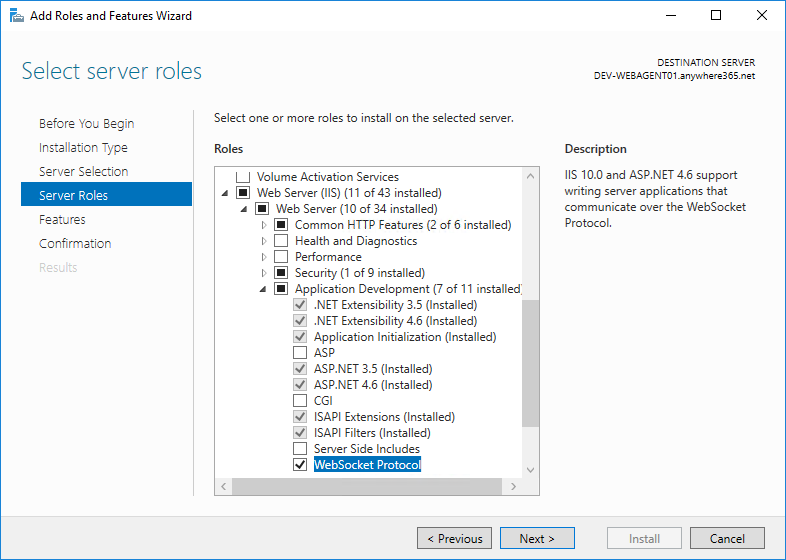
Open Turn Windows features on or off
-
Add websocket protocol role